
Network Analyzer Pro: IP Tools
App Store · Utilities
Network Analyzer Pro: IP Tools(Jiri Techet)은(는) Utilities 카테고리의 App Store 앱으로, 독일 차트 수집 과정에서 기록됐습니다.
Network Analyzer Pro: IP Tools 관측 요약
| 스토어 | App Store |
|---|---|
| 카테고리 | Utilities |
| 개발사 | Jiri Techet |
| 관측 국가 | 독일 |
| 콘텐츠 수집일 | 2026-09-02 |
Network Analyzer Pro: IP Tools은(는) 어떤 앱인가
Network analyzer Pro는 iPhone 또는 iPad를 강력한 진단 도구로 바꿔주는 완전한 네트워크 툴킷입니다. 연결 속도 저하 문제를 해결하거나, 네트워크에서 알 수 없는 장치를 추적하거나, 인터넷이 트래픽을 라우팅하는 방법을 탐색하는 등 전문가 수준의 도구 세트를 주머니에 넣을 수 있습니다. 데스크탑이나 추가 하드웨어가 필요하지 않습니다.
LAN에 연결된 모든 장치를 검색 및 식별하고, 세계 지도에서 경로 추적이 펼쳐지는 것을 관찰하고, 실제 다운로드 및 업로드 속도를 측정하고, 핑, 경로 추적, 포트 스캐닝, DNS 조회 및 whois를 통해 모든 호스트를 진단합니다. 호기심이 많은 가정 사용자부터 매일 빠르고 정확한 결과를 필요로 하는 IT 전문가까지, Network analyzer Pro는 하나의 세련된 앱에서 필요한 모든 것을 제공합니다.
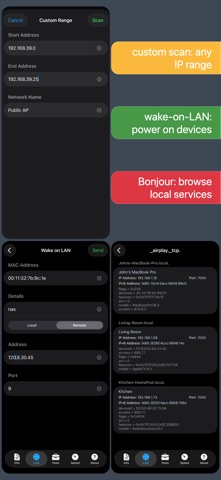
LAN 스캐너: - 모든 네트워크 장치(Wi-Fi 및 VPN)를 빠르고 안정적으로 감지 - 검색된 모든 장치의 IP 주소 - 사용 가능한 경우 NetBIOS, mDNS(Bonjour), LLMNR, DNS 및 SNMP 이름 - 검색된 장치의 연결성(ping) 테스트 - IPv6 가용성 및 검색된 IPv6 주소 - 사용자 정의 장치 이름, 스캔 기록 및 즐겨찾기 - 장치 빠른 작업: 웹 인터페이스 열기, 장치의 Bonjour 및 UPnP 서비스 탐색 또는 깨우기 - 원격 WOL을 포함한 WOL(Wake on LAN) - 사용자 정의 IP 범위 스캔 - 발견된 장치 목록에서 필터링 및 검색
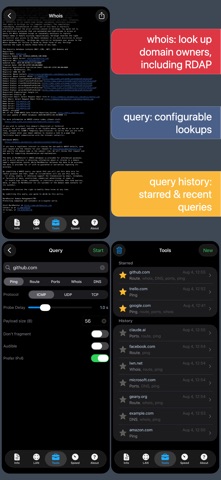
핑 및 경로 추적: - 모든 네트워크 노드에 대한 IP 주소 및 호스트 이름을 포함한 왕복 지연 - 선택 가능한 ICMP, UDP 및 TCP 핑 - 구성 가능한 프로브 지연, 페이로드 크기, TCP 포트 및 조각화 안 함 플래그 - 핑 소리가 들림 - 위도, 경도, 국가, 도시, 시간대를 포함한 지리적 위치 데이터 - AS번호 및 네트워크명 정보 - 지도에서 완벽한 경로 추적 시각화 - 실시간으로 업데이트되는 그래픽 핑 통계 - 구성 가능
Traceroute에 대한 ICMP/UDP 프로브 및 프로브 지연 - IPv4 및 IPv6 모두 선택 가능
포트 스캐너: - 공통 포트, 사용자 정의 포트 범위 또는 전체 포트 범위를 스캔합니다. - 폐쇄, 방화벽, 개방 포트 감지 - 알려진 오픈포트 서비스에 대한 설명 - 사용자가 편집 가능한 공통 포트 목록 - 조정 가능한 스캔 속도 - IPv4 및 IPv6 모두 선택 가능
후이즈: - 도메인, IP 주소, AS 번호 조회 - 클래식 whois와 최신 RDAP 프로토콜 모두 지원 - 맞춤형 whois 및 RDAP 서버
DNS 조회: - nslookup 또는 dig와 유사한 기능 - 모든 레코드 유형을 한 번에 쿼리하거나 특정 유형 하나를 쿼리 - A, AAAA, CAA, CNAME, HINFO, LOC, MX, NAPTR, NS, PTR, SOA, SPF, SRV, SSHFP, TXT 레코드 지원 - DNSKEY, CDNSKEY, RRSIG, NSEC3PARAM, NSEC, NSEC3, DS, CDS, TLSA와 같은 DNSSEC 레코드 디코딩 및 표시 - 맞춤형 DNS 서버 및 포트 - 재귀를 비활성화하고 모든 응답 섹션을 표시하는 옵션
인터넷 속도: - 다운로드 및 업로드 속도 테스트 - 그래픽 속도 테스트 보기 - 속도 테스트 내역
네트워크 정보: - 기본 게이트웨이, 외부 IP(v4 및 v6), DNS 서버, HTTP 프록시 - 외부 IP 호스트 이름, AS 번호, AS 이름 - SSID, BSSID, 라우터 공급업체, 보안 유형, IP 주소, 서브넷 마스크 등 Wi-Fi 네트워크 정보 - VPN, USB 이더넷 및 개인 핫스팟 연결 세부정보 - 듀얼 SIM을 지원하는 네트워크 유형 등의 셀 네트워크 정보 - Wi-Fi, 셀 및 VPN 데이터 사용량 모니터링(마지막 부팅 이후 전송 및 수신된 데이터 모두)
로컬 서비스 검색: - 봉쥬르 서비스 브라우저 - UPnP/DLNA 서비스 및 장치 브라우저
Siri, 단축키 및 제어 기능: - 모든 도구에 대한 Siri, Spotlight 및 단축어 앱 지원 - 제어 센터, 잠금 화면 및 동작 버튼 컨트롤 - 공유 확장: Safari의 공유에서 바로 어떤 웹사이트든 쿼리할 수 있습니다.
시트 - 홈 화면 빠른 작업
더 보기: - 밝고 어두운 테마 - 어디에서나 완전한 IPv6 지원 - 즐겨찾기에 별표를 표시할 수 있는 기능을 통해 수행된 모든 작업의 기록 - 대부분의 도구를 이메일, AirPrint 및 AirDrop으로 내보내기 - 복사/붙여넣기 지원 - 자세한 도움말 - 정기 업데이트
스토어 설명을 기계 번역한 내용입니다.
현재 관측 상태
이 앱은 최근 관측 창(신규·급상승)에 포함돼 있지 않아 최신 순위 근거가 없습니다. 수집된 스토어 콘텐츠만 표시하며, 없는 순위를 추정하지 않습니다.
스크린샷



순위 이력 보기
Network Analyzer Pro: IP Tools 순위 궤적 차트에서 국가·차트별 일별 순위를 볼 수 있습니다. App Store에서 보기